Backtesting
Backtesting runs your agent over historical market data so you can see how a strategy would have performed before you risk anything on it. It's the safest way to compare settings, sanity-check an idea, and build confidence in an agent before you switch it live.
Backtesting is a Pro feature.
How Bilo backtesting is different
Most platforms backtest with a separate simulator that approximates the trading engine. Bilo doesn't. A backtest replays your live trading engine over stored one-minute candles: the same entry and exit evaluation, the same safety-order logic, the same order execution and fee accounting that runs in production — just fed historical candles instead of the live feed.
Because there is no separate simulator to drift out of sync, what you see in a backtest is what the live engine would have done over that period (within the one-minute limit described below). The results aren't a special report, either — they're ordinary deals, stamped with their historical times, rendered on the agent's normal analytics, positions, and history pages.
Before you can backtest
Backtesting is on the Pro plan: on any other plan the Backtest panel is not shown at all.
Within Pro, the Run Backtest button is available only when the agent is in a safe, hands-off state — nothing real can be at stake while a replay takes over. An agent can be backtested when all of the following are true:
- The agent is a paper-trading agent.
- The agent is stopped (deactivated).
- It has no open positions.
- It has no orders in flight.
- You have fewer than 2 backtests queued or running across your agents.
If any of these aren't met, the button is disabled and tells you why (for example, "bot must be deactivated first").
Running a backtest
Open the agent's analytics page. A Backtest panel sits at the top:
- A brand-new agent shows a call to action — a short description and the controls to start your first replay.
- An agent that has already been backtested shows a result chip with the range it ran and when, plus a Re-run backtest link that reveals the same controls again.
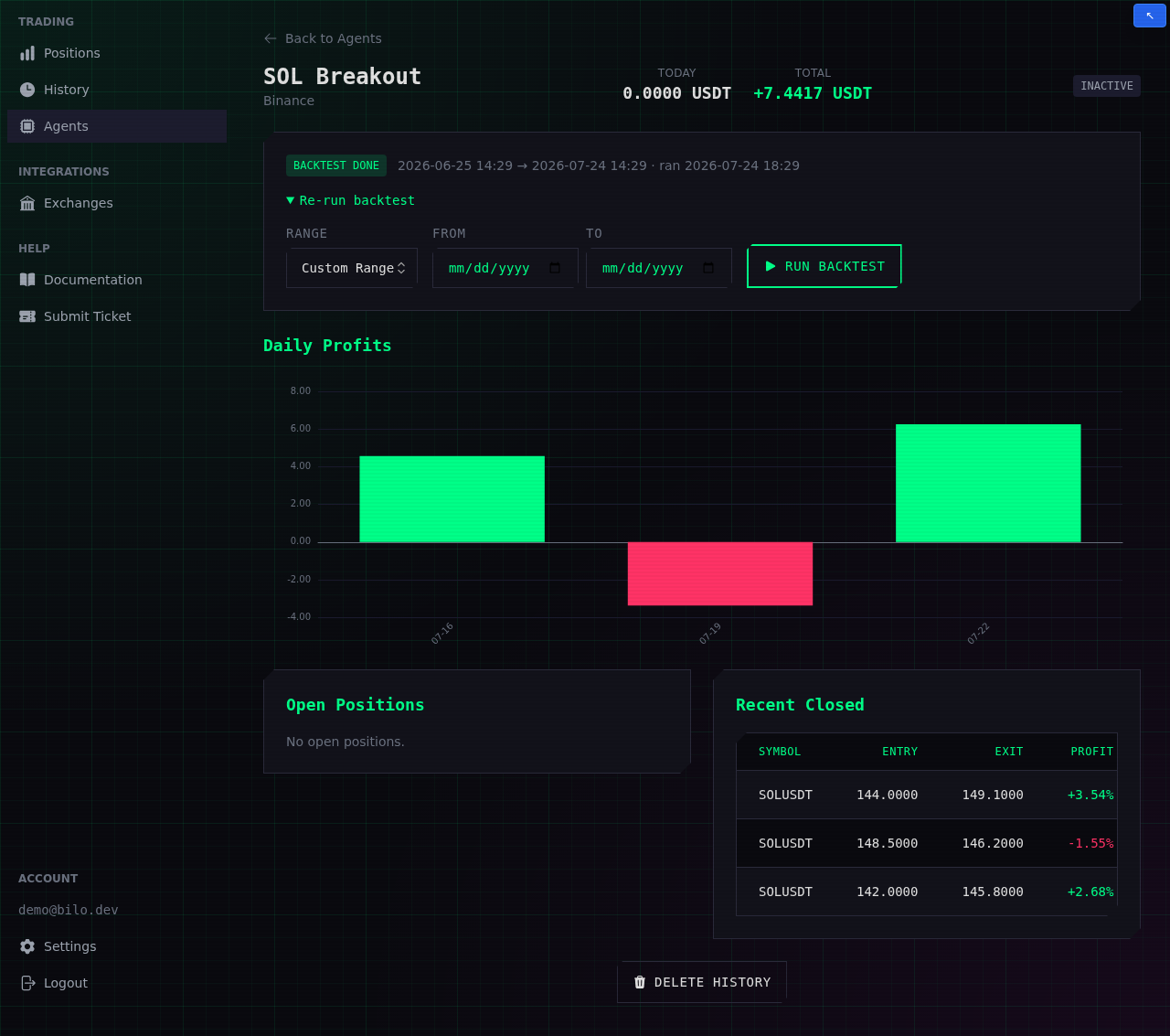
Pick a Range and press Run Backtest:
- Last Week, Last Month, Last 3 Months, Last Year — a window ending now.
- Custom Range — choose your own From and To dates. The range must start before it ends, cannot reach into the future, and cannot span more than a year.
You'll be asked to confirm, because running a backtest replaces the agent's closed history (see One backtest per agent).
Once started, the backtest is queued and runs in the background:
- The panel shows a live status while it works (queued, then replaying candles), and the page refreshes itself until the run lands on done or failed.
- Bilo automatically fetches any missing candles for the range from the exchange before replaying. Periods the exchange itself has no data for are simply skipped — the replay treats them exactly like a gap in the live feed.
Reading the results
When the run finishes, the backtest's deals populate the agent's ordinary analytics — there's no separate results screen to learn.
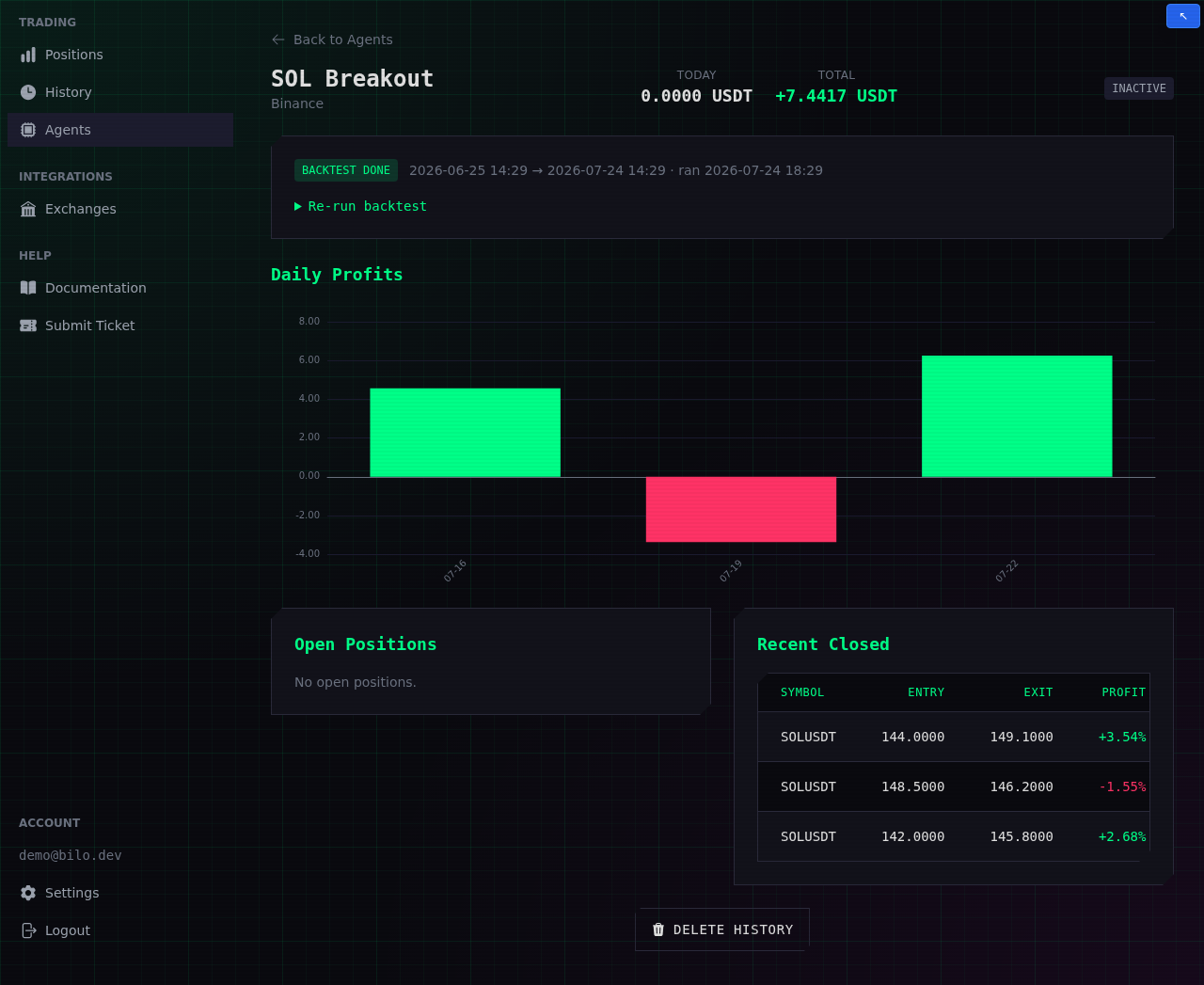
- Result chip — the range that was replayed and when it ran, with a BACKTEST DONE (or FAILED) badge.
- Today / Total PnL — the replay's realized profit, net of fees.
- Daily Profits — net realized profit per day over the tested period; green bars are profitable days, red bars losing ones.
- Closed Positions — the trade log: every deal the strategy would have taken, with entry, exit, and profit, newest first. The same deals also appear on the History page.
- A deal the replay was still holding when the range ended is closed at the last replayed price and marked RANGE END. That exit is a valuation, not a sale, so read those deals as a snapshot of an unfinished trade rather than a result the strategy actually banked.
- Click any deal to open its Position Details — the candlestick chart with a marker at every simulated buy and sell, plus the order-by-order breakdown. This is where you check how the strategy traded, not just how much it made.
What to look at
A high total is a starting point, not the whole story. When you review a backtest, weigh:
- Net profit after fees. Every figure above is already net of trading fees. A strategy that trades often can hand most of its gross profit back in fees — watch the net.
- How the deals were placed. Open a few deals and look at the chart. Entries at sensible points beat a higher return built on scattered, lucky-looking fills.
- The win/loss mix and deal durations. The closed-deal cards show each deal's profit and its opened/closed times. Consistent small wins and short, controlled recoveries are usually healthier than a few large, long-running rescues.
- Behaviour across market phases. A strategy that only shines in one strong trend may struggle in a sideways or falling market — test more than one range.
One backtest per agent (destructive)
Each agent keeps one backtest. Running a new one first wipes the agent's closed history and replaces it with the fresh replay — the confirmation dialog warns you before this happens. Open positions are never touched (and a backtest-eligible agent has none anyway).
To compare variations without losing a result, clone the agent (from the Agents dashboard), change the one thing you want to test, and backtest the clone. Keeping each variant as its own agent lets you line their results up side by side.
Live vs. backtested results
Backtesting replays one-minute candles — there is no tick-level price data. That matters for how closely a backtest matches live trading:
- Indicator conditions (RSI, Bollinger Bands, MACD, moving-average crossovers, and so on) are evaluated once per interval candle, exactly as they are live.
- Price-based protections (Take Profit, Stop Loss, safety orders, trailing buy) are checked on each replayed one-minute candle.
- Fills use the price of the candle that triggered them — the exact level the decision was made at, with no spread and no slippage. Live, the agent sends a market order that fills at whatever the exchange is offering a moment later, which in the fast moves that fire stop losses and take profits is usually a little worse. Read a backtest's fills as the optimistic end of what live trading would have done.
See Evaluation Timing for how the same timing rules apply to live trading. The practical takeaway: backtesting is excellent for comparing strategies and settings, but treat the exact entry/exit prices as close approximations rather than guarantees.
A suggested workflow
- Start on a liquid pair you know well — BTC/USDT or ETH/USDT — with a paper-trading agent.
- Choose a market period that matches how you intend to trade (trending, ranging, or falling).
- Begin with one simple entry signal and confirm it produces sensible deals on the chart before adding anything.
- Tune the entry — adjust the signal's parameters, or add a second condition to filter out weak entries. See Signals.
- Tune the safety orders — price deviation, step scale, and volume scale control how the agent averages down. See Bot Settings.
- Review the deals and net PnL, then change one thing at a time so you can tell what actually helped.
- Repeat across periods and pairs — clone the agent onto other markets to check the strategy holds up more broadly.